AI: Document Intelligence
When an auditor can ask a question and get a precise answer from thousands of contracts in seconds — the work shifts from searching to deciding.
AI ML
0 -> 1
Role
UX Designer
Timeline
6 months
team
8 Engineers, 2 PM, me
platform
Web
The Real Problem
EY auditors were reviewing 3–5 document sets daily. Each review meant manually reading through dense contracts, financial records, and evidence files — searching for specific answers with no smarter way to find them than reading everything. People were spending hours on work that felt like it should take minutes, and doing it again every single time.
But here's what made it worse: the tool they had was essentially a file viewer. There was no way to ask a question. No way to search by meaning. If you needed to know whether a contract allowed early termination, you opened it, scrolled, and hoped the answer was obvious.
The feedback was consistent:
'I spend more time finding the answer than I do analyzing it.'
'Every document review feels like starting from scratch.'
'We can't afford to miss things — but we also can't keep working this way.'
The underlying issue wasn't just slow tooling. Nobody had ever designed the document review experience around how auditors actually think. They reason in questions — not keywords.

Finding the Fix
When I joined, my brief was narrow: take the PM's feature list and turn it into interactions. What existed as research was a basic storyboard, an existing flow analysis, and an FAQ document. It raised more questions than it answered.
So I pushed back. I convinced the PM and stakeholders to let me run contextual user interviews before design began — not to slow things down, but to make sure we were solving the right problem. After those sessions, three things stood out clearly:
Auditors search by meaning, not by words. They weren't hunting for specific phrases. They were asking questions — "does this clause allow amendments?" Keyword search was failing them quietly, and they'd stopped trusting it.
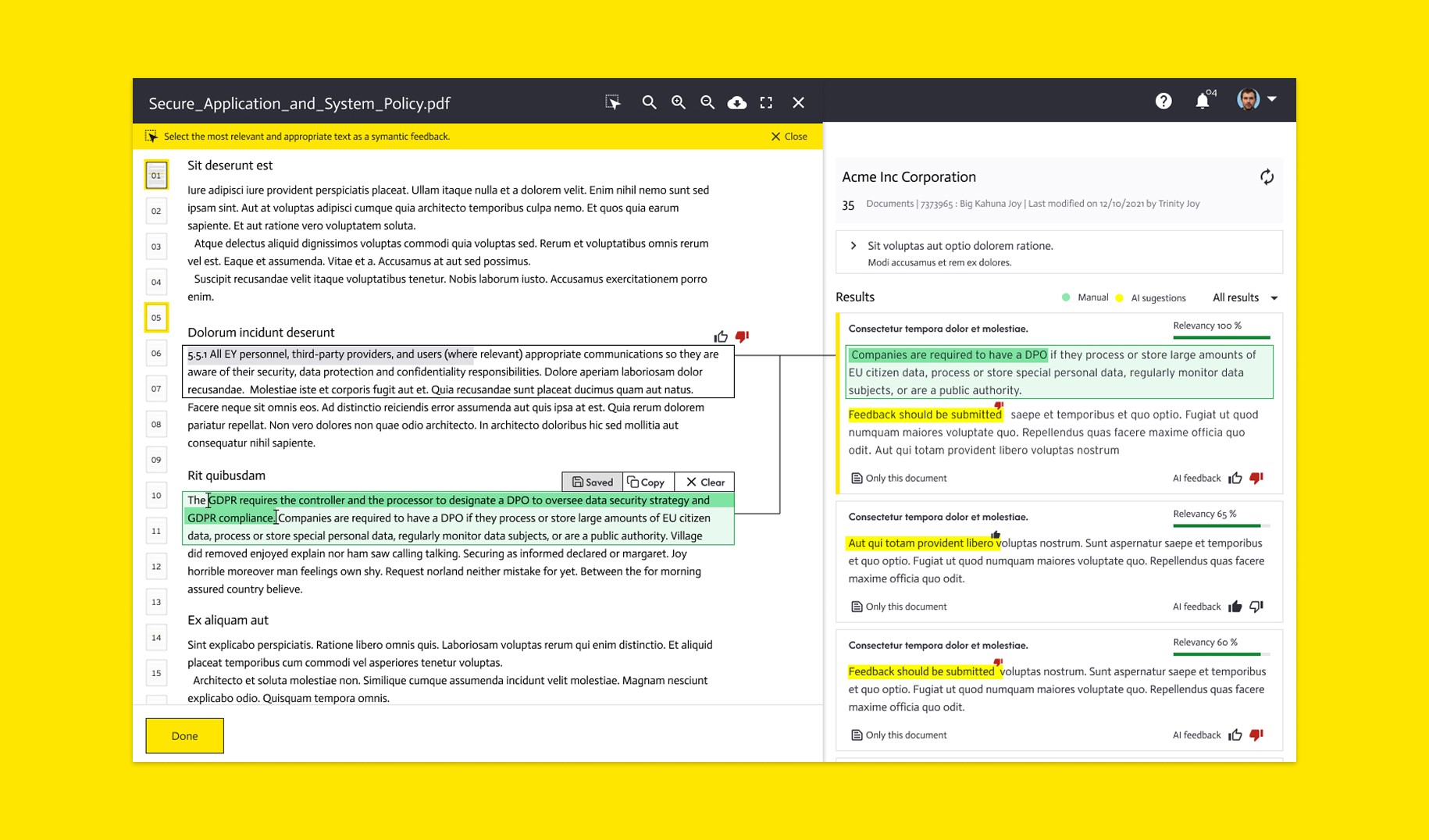
Trust in AI results was conditional. Users needed to see where an answer came from inside the document — not just what the answer was. A floating AI response with no source felt like a guess, and auditors couldn't stake professional judgment on a guess.
Terminology was slowing decisions down. Legal and financial terms appearing in AI results were creating confusion at the exact moment users needed confidence.
I also ran a "Key Elements" session with the AI engineers — sitting together to map what the system needed to do versus what the user needed to see. It gave the whole team a shared language for the first time, and it changed how every design decision was made after that.

What Actually Happened
I wireframed the core experience and ran moderated testing with EY auditors. Real tasks, no hints, no hand-holding. Every participant completed what we asked. The problems that surfaced were specific and fixable.
For example: my first version of the AI result showed the answer inline — clean, simple, fast. But testers kept asking "where is this coming from?" The answer felt unsupported. I redesigned it so the relevant passage in the source document was highlighted alongside the AI response. The anxiety disappeared immediately.
The terminology issue showed up in testing too. Users moved through the flow confidently but hesitated on certain AI-generated labels. That became a clear next iteration — contextual tooltip definitions on terms users flagged as confusing. Small addition, real difference.
We ran a flash feedback session before broader rollout. The response was immediate — users noticed the source highlighting within minutes and called it out as the feature that made them trust the tool.
'Clean and modern.'
'No hindrance to understanding the basic flow.'
'AI suggestions are helpful.'
'I can find what I need most of the time.'
'We need help understanding some of the terms.' — logged directly into the next sprint.
Zero users asked to go back to manual search, which felt like the real signal.

What Changed
Document Intelligence launched in December 2023 and gained traction across EY and Microsoft. The impact showed up fast.
Document review time dropped by 90%. Operational costs decreased by 80%. Teams recovered over 120 hours monthly that had been going into manual document processing — time that went back to actual audit work instead.
But the feedback that stayed with me was simpler than any of that:
'I actually trust what it's showing me.'
'I used to dread document review. Now it's just part of the workflow.'
'It feels like someone finally asked us what we needed.'

What I Had to Work With
No established research baseline. The project started with storyboards and assumptions, not validated user needs. I had to make the case for research mid-project while delivery was already moving. Getting two to three weeks for interviews meant presenting the PM and stakeholders with a short proposal showing exactly what decisions it would unlock. They said yes.
A large, distributed team. Twelve AI engineers, cross-functional stakeholders, and a design review process that was pulling in every direction. At one point the feedback was so scattered I had to create a shared document where every stakeholder commented on the same version — and started recording prototype walkthroughs with live audio to send to people who couldn't attend syncs. Reviews got shorter. Decisions got faster.
Designing for AI behavior without controlling it. I couldn't change what the model did — only how it was presented to users. Every design decision had to make the AI feel trustworthy and legible, even when the results were imperfect.
These constraints shaped the whole approach. Instead of redesigning the platform, I focused on the layer that sat between the AI and the user — and made that layer feel honest.

What I'd Do Differently
I'd push harder for user access earlier. The contextual interviews I ran were valuable, but they happened after the project had already started moving. Getting to auditors in week one — before any storyboarding — would have saved several rounds of direction changes later.
I'd also document the AI behavior more systematically as a design input. I was designing around what the model could do, but I learned its edge cases through testing rather than up front. A proper constraints map shared between design and engineering at the start would have saved time mid-project.
What I Learned
Scope creep isn't always a problem — sometimes it's the job. My formal brief was interaction design. The most valuable thing I did was convince the team to do research first. Knowing when to expand your role, and how to frame it as reducing risk rather than adding time, is a real skill that compounds.
Shared language between design and engineering beats documentation. The Key Elements session with the engineers was the highest-leverage hour I spent on this project. When both sides understand each other's constraints, the product gets better faster — and you stop redesigning things that can't be built.
Making invisible processes visible builds trust. The document source highlight wasn't technically necessary — the AI answer was accurate either way. But showing users exactly where the answer came from transformed how they felt about the whole tool. Sometimes the most important design work is making the system feel honest.